Thursday, September 12, 2024

How Can You Test and Revert a Failover in Azure Cache for Redis Premium with Geo-Replication?

If you're using Azure Cache for Redis Premium with geo-replication across different regions, knowing how to test failover and revert it is essential to ensure your infrastructure can handle disasters seamlessly. In this article, we'll walk you through how to perform a manual failover test and revert it back using Azure Portal—helping you maintain operational stability between your cache instances in different regions.

Why Failover and Reverting Is Important?

Azure Cache for Redis Premium supports geo-replication, allowing you to replicate data between cache instances in different Azure regions. By testing the failover process, you can simulate disaster recovery scenarios where one region goes offline, and the other takes over automatically. Reverting back after a failover ensures that your original setup is restored without disruption once the primary region is available again.

In our case, we have two Redis caches:

  • Primary cache located in Central US.
  • Secondary cache located in East US 2.

Both caches are using Private Link endpoints to ensure secure and isolated connectivity.

Step 1: Testing the Failover in Azure Cache for Redis

Testing failover allows you to simulate a disaster recovery scenario where the secondary cache becomes the primary. Here’s how to do this through the Azure Portal:

1.1 Navigate to the Primary Redis Cache

  • Log into the Azure portal.
  • Search for Azure Cache for Redis and select your primary Redis cache (in Central US).

1.2 Access Geo-Replication Settings

  • Under the Settings section of the Redis cache, select Geo-replication.
  • You will see your secondary Redis cache (in East US 2) listed as a replica.

1.3 Initiate the Failover

  • Click on the secondary Redis instance to open the details.
  • At the top of the page, click Initiate Failover.

Once the failover is initiated, the secondary cache in East US 2 will become the new primary. This process typically takes a few minutes, and during that time, the new primary starts accepting traffic while the original primary goes into a secondary state.

1.4 Testing the New Primary

After the failover, test the new primary cache (East US 2) by writing and reading data to ensure that it's functioning correctly:

redis-cli -h <new-primary-private-endpoint> -a <new-primary-access-key> SET "test:key" "Data after failover" 
redis-cli -h <new-primary-private-endpoint> -a <new-primary-access-key> GET "test:key"

This verifies that the new primary cache is fully operational.


Step 2: Reverting the Failover to the Original Primary

Once the failover test is complete, you'll want to revert the setup to its original configuration, with Central US as the primary cache. Here’s how you can do that:

2.1 Break the Existing Geo-Replication

  • Go to the new primary Redis cache (in East US 2).
  • Navigate to Geo-replication under the Settings section.
  • Click on the original primary cache (Central US) that is now secondary and select Unlink to break the geo-replication.

2.2 Re-establish the Original Setup

  • Go to the original primary Redis cache (in Central US), which is now secondary.
  • Select Geo-replication and click Add Replication.
  • Choose the East US 2 Redis cache (the new primary) as the replica, and click Create.

This step promotes the Central US cache back to the primary, with the East US 2 cache becoming secondary again.

2.3 Verify and Test

Once geo-replication is re-established, write and read data from the Central US cache (the original primary) to confirm that the revert has worked successfully:


redis-cli -h <central-us-private-endpoint> -a <central-us-access-key> SET "revert-test:key" "Reverted to original primary" 
redis-cli -h <central-us-private-endpoint> -a <central-us-access-key> GET "revert-test:key"

Also, check the data consistency in the secondary cache (East US 2) to ensure replication is working:

redis-cli -h <east-us-2-private-endpoint> -a <east-us-2-access-key> GET "revert-test:key"

Conclusion

Testing and reverting failover in Azure Cache for Redis Premium is a critical part of maintaining a high-availability, disaster-ready infrastructure. By following the steps outlined, you can easily test failover scenarios and revert back to the original configuration—all within the Azure Portal.

Both the failover and revert processes ensure that your application remains resilient to regional outages, and help maintain data integrity and availability in your distributed systems. Make sure to monitor the health and performance of your Redis instances during the failover and reversion process to ensure optimal performance.

Monday, September 9, 2024

How Does a Private Endpoint Impact Redis Cache and Subnet Configuration in Azure?

Introduction


In Azure environments, using a Private Endpoint for services like Redis Cache ensures secure, private connections between resources. However, when configuring these endpoints, questions often arise regarding subnet usage, IP consumption, and overall networking best practices. This article addresses some common concerns and provides clarity on how to manage your subnets when working with Private Endpoints.

1. Where Can I See in the Azure Portal That My Private Endpoint Is Connected to a Subnet?

To verify which subnet your Private Endpoint is connected to, you can follow these steps in the Azure portal:

  1. Navigate to the Azure portal (https://portal.azure.com).
  2. Search for your Redis Cache: In the search bar, type "Redis" and select your Redis Cache resource.
  3. Access Private Endpoints: Under the "Settings" section, select Private Endpoint Connections to view the associated endpoints.
  4. Check Subnet Details: Select the Private Endpoint and review the Network Configuration section to identify the subnet.

This straightforward process will give you insight into which subnet your Redis Cache's private endpoint is connected to.

2. Is It Fine to Have Other Components in the Same Subnet as My Redis Cache’s Private Endpoint?

Yes, it is typically fine to have multiple components in the same subnet as long as your network is properly configured. However, there are a few factors to consider:

  • Subnet IP Address Range: Ensure that there are enough available IP addresses to accommodate all resources within the subnet, including the Redis Cache's private endpoint.
  • Network Security Group (NSG): Double-check that your NSG rules do not block necessary traffic to and from the Redis Cache.
  • Private DNS Zone: Make sure that the private DNS zone resolves the Redis Cache’s private endpoint correctly to ensure seamless internal communication.

Testing Redis Cache Connectivity

To ensure everything is working smoothly, you can test the Redis Cache using:

  • Redis CLI: Try connecting to the Redis Cache using a client or the Redis CLI from a VM in the same virtual network and run commands like PING, SET, or GET.
  • Azure Network Watcher: Use Connection Troubleshoot to test connectivity between the source (e.g., VM) and the Redis Cache private endpoint.
  • Logs: Review Redis Cache logs to detect any potential connectivity issues.

3. How Many IPs Does Redis Cache Using a Private Endpoint Use in a Subnet?

When Redis Cache is connected via a Private Endpoint, it consumes one IP address in the subnet for each private endpoint. This IP address is assigned to the private link interface that connects the Redis Cache to the virtual network.

It's important to note that the Redis Cache service itself doesn't consume additional IPs directly from the subnet—only the Private Endpoint requires one. If you have multiple private endpoints for the same Redis Cache across different subnets or regions, each of those endpoints will also consume one IP address per subnet.

4. What Size Should My Subnet Be for a Redis Cache Private Endpoint?

Determining the correct subnet size is crucial for both current operations and future scalability. Here’s how you can plan:

IP Address Consumption

  • Private Endpoint: Each private endpoint consumes 1 IP address.
  • Azure Reserves: Azure reserves the first 4 and last 1 IP addresses of every subnet for internal use, leaving the rest for your resources.
  • Other Resources: Any other VMs, application gateways, or services in the same subnet will consume additional IP addresses.

Subnet Size Calculation

Consider using the following CIDR blocks based on your needs:

  • /28 gives 16 IP addresses (11 usable).
  • /27 gives 32 IP addresses (27 usable).
  • /26 gives 64 IP addresses (59 usable).
  • /25 gives 128 IP addresses (123 usable).

For a Redis Cache private endpoint with minimal additional resources, a /28 subnet might suffice. However, for future scalability and more components, a /26 subnet is recommended.

5. Why Does Azure Reserve 5 IP Addresses in a Subnet?

Azure reserves 5 IP addresses in every subnet, regardless of size, for the following reasons:

  1. First IP (Network address): This IP defines the subnet and is reserved for the network identifier.
  2. Second IP: Reserved for Azure services.
  3. Third IP: Reserved for future use by Azure.
  4. Fourth IP (Default gateway): This IP is used as the default gateway for routing traffic outside the subnet.
  5. Last IP (Broadcast address): Reserved as the broadcast address, though broadcast traffic isn't typically used in Azure.

For example, in a 10.0.0.0/24 subnet:

  • 10.0.0.0 is the network identifier.
  • 10.0.0.1 is reserved for Azure.
  • 10.0.0.2 is reserved for future use.
  • 10.0.0.3 is the default gateway.
  • 10.0.0.255 is the broadcast address.

Conclusion

Configuring Redis Cache with Private Endpoints in Azure requires a solid understanding of how subnets, IP addresses, and networking rules work together. By following these guidelines, ensuring adequate subnet sizing, and testing your configuration, you can optimize performance and maintain secure connections.

Always monitor your subnet usage, plan for scalability, and review security configurations regularly to ensure smooth operations within your Azure environment. 

About Me

I’m Sujith Sagar Gandi, an IT professional with extensive experience in cloud architecture, networking, and infrastructure solutions. I specialize in configuring and managing Azure environments, with a focus on optimizing infrastructure for businesses and individuals alike. Sharing insights about cloud technologies is something I’m passionate about, and I aim to simplify complex concepts for others.

Feel free to connect with me on LinkedIn to follow my work and get in touch!

Sunday, March 31, 2019

Basics of Programming in C (part-6)


Hello Everyone!


Welcome to the 7th post. This post is contributed by Sumanth Nidamanuri.

In the previous post we have discussed about switch case statements.
Basics of Programming in C (part-5):

In this post we are going to discuss Functions. This post will take less than 10 minutes to completely read and to understand it.

Function
A computer cannot perform all the tasks by itself.So it utilizes the entities named functions.
But what is a function?
According to Wikipedia a function means to work or operate in a particular way.Similarly a function in C also performs a desired task according to the user requirements.  

Definition
A function is a self contained block of code that performs a particular task of acting on data and may return a value.

Function prototype:
Datatype function_name(datatype variable-1,datatype variable-2,_ _ _ _)
{
            Local declarations;
            Executable statements;
            Return statement;

}
The part within the curly braces is called the body of the program and the initial line 
is called the header.The header consists of the function name,the return type of the function and the number and the type of the arguments passed to the function.  

Example:

Code:


Output:

Explanation:


As the C program executes from top to bottom initially the main() calls the function call_fun().This means that the control passes  to function call_fun().The functioning of main is temporarily suspended and the call_fun() starts working.When all the statements in the call_fun() are executed then again the control passes to the main() exactly at the point where the control has been transferred to the call_fun().

Here main() is the calling function and call_fun() is the called function.

Basically there are two types of functions.
1.user defined functions
2.built-in functions

User defined functions: these are created by the user as per the requirement of the program


Built-in functions: these are the part f the standard library and are made available by the compiler as a  part of the compiler package.

Passing values between functions:
Example:
#include<stdio.h>
int sum(int x,int y,int z);
int main(){
  int a,b,c,result=0;
  printf("\n enter the values of a,b,c:");
  scanf("%d %d %d",&a,&b,&c);
  result=sum(a,b,c);
  printf("\n THE SUM OF THE NUMBERS IS %d ",result);
  return 0;
}
int sum(int x,int y,int z){
  int p;
  p=x+y+z;
  return (p);

}

Output:

enter the value of a,b,c: 2 4 9

THE SUM OF THE NUMBERS IS 15

Explanation:
The values of a,b,c which are read from the user are passed to the function sum() from the main().

In the sum() these values get collected in the variables x,y,z.The variables a,b,c are called the actual parameters and x,y,z are formal parameters.

Any numbers of arguments can be passed to a function.But the number of parameters and the data type must match otherwise it results in an error.sum() returns a value p which is of data type integer .So in the function prototype the return type of the function sum() is declared int.

On execution of the return the control directly passes to the calling function and the sum of the three numbers is being returned back to the main().

The important point to note here is the scope.The scope of the variables x,y,z  is limited only between the braces of the function sum().That means that these cannot be used outside the braces.

That’s all for this post.In next post we will discuss about recursion functions

Share it with your co-geeks and help us to improve by giving feedback in the comments section below.

Thank you.

 ABOUT US
SUMANTH NIDAMANURI, B.tech SECOND YEAR  COMPUTER SCIENCE AND ENGINEERING STUDENT AT ANITS and SUJITH SAGAR, B.tech SECOND YEAR COMPUTER SCIENCE AND ENGINEERING STUDENT AT NIT DELHI.


Basics of Programming in C (part-5)


Hello Everyone!


Welcome to my 6th post. First of all, I should thank my parents, sister and my friends for supporting me and encouraging me.

In the previous post we have discussed about switch case statements.
Basics of Programming in C (part-4):

In this post we are going to discuss for loops and while loops. This post will take less than 5 minutes to completely read and to understand it.

Loop statements

Loop statements are used when we want to execute some line of code repeatedly. 
For loops are used when we know the number of times we run the loop. 
while loops are used when we are not sure about the number of times we run the loop.

Syntax:

FOR loop:

for(counter_variable initialization; for_condition; counter_variable increment/decrement )
{
        statements;
}


WHILE loop:

while(while_condition)
{
      statements;
}

Do WHILE loop:

do
{
      statements;
}while(while_condition);


In For loop parenthesis we have three parts. First is for initialization, Second is for condition and third is to increment or decrement  the counter variable.

First the variable is initialized. Then the condition is checked. If the condition evaluates to be true then compiler will execute the statements inside the loop block. after execution, it will increment/decrement the counter variable and will check the condition again. if condition is true then executes the block statements, otherwise the flow of control comes out of the loop and continues to execute the statements outside the loop.

Similarly in WHILE loop also, first the condition is evaluated. If it is true then statement inside the block are executed else loop is terminated. After executing the statements inside the loop compiler will check for the while condition.

In DO WHILE loops, the while condition is evaluated after executing the statements for the first time. Therefore, in Do while loops even if the condition evaluates to be false the statements are executed once.

Note: In both types of loops we need to take care of termination condition. Otherwise, the loop runs infinitely many times(😈).

Example:
Code:


Output:


That’s all for this post. In the next post we’ll discuss about  Functions.

Share it with your co-geeks and help me to improve by giving feedback in the comments section below.

Thank you.

 ABOUT ME


MYSELF SUJITH SAGAR. I AM A B.tech SECOND YEAR  COMPUTER SCIENCE AND ENGINEERING STUDENT AT NATIONAL INSTITUTE OF TECHNOLOGY DELHI.

Basics of Programming in C (part-4)


Hello Everyone!


Welcome to my 5th post. First of all, I should thank my family and my friends for supporting me and encouraging me.

In the previous post we have discussed Conditional statements.
Basics of Programming in C (part-3):

In this post we are going to discuss about switch case statements. This post will take less than 5 minutes to completely read and to understand it.

Switch case

Switch case changes the direction of flow of control with respect to the input. The condition in switch statement is compared with case statements in the switch block.when the switch condition and case condition both are equal, the statements in that specific case block are executed. Using default statement is optional but it is preferred to handle errors when switch condition does not matches with any of the case conditions.

Therefore, the statements in the default block executes only if the switch condition does not matches with any of the case conditions.

Using break statement is optional.

Note: If there is no break statement in case blocks then after executing the necessary  case block instead of exiting the switch block compiler executes all other case block which are followed by the necessary case block. We should use break statement in each case block in order to prevent the flow of control in entering into next case block. 


Flow chart:


Syntax :

 switch(choice_variable)
{
          case case_variable-1:
          Statements-A;
          break;

          case case_variable-2:
          Statements-B;
          break;
          .
          .
          .
          case case_variable-n:
          Statements;
          break;
           
          default:
          Statements;
}


Example:
Code:


Output:


That’s all for this post. In the next post we’ll discuss about  for loops.

Share it with your co-geeks and help me to improve by giving feedback in the comments section below.

Thank you.

 ABOUT ME


MYSELF SUJITH SAGAR, B.tech SECOND YEAR  COMPUTER SCIENCE AND ENGINEERING STUDENT AT NATIONAL INSTITUTE OF TECHNOLOGY DELHI.


Saturday, February 16, 2019

Basics of Programming in C (part-3)


Hello Everyone!


Welcome to my 4th post. First of all, I should thank my parents, sister and my friends for supporting me and encouraging me.

In the previous post I covered topics like constants, variables and data-types etc.
Basics of Programming in C (part-2):

In this post I am going to explain about Conditional statements. This post will take less than 5 minutes to completely read and understand it.

Understanding Conditional Statements

In order to understand conditional statements, first we need to understand conditions.
In C, conditions are logical statements whose final value will be either true(it is generally represented as integer 1 or any non-zero integer ) or false(it is represented as 0)

In logical statements, we need to use logical operators.
Some of the logical operators are:

·        == (if L.H.S and R.H.S are equal then this operator returns true(1) else returns false(0))
Example: (2+1)==3 returns true and 2==3 returns false

·        < (if L.H.S is less than R.H.S then this operator returns true(1) else returns false(0))
Example: 2<3 returns true and 5<4 returns false

·        > (if L.H.S greater than R.H.S then this operator returns true(1) else returns false(0))
Example: 3>2 returns true and 2>8 returns false

·        <= (if L.H.S less than or equals to R.H.S then this operator returns true(1) else returns false(0))
Example: 2<=3 returns true and 4<=3 returns false

·        >= (if L.H.S greater than or equals to R.H.S then this operator returns true(1) else returns false(0))
Example: 4>=3 returns true and 6>=10 returns false

·        != (if L.H.S and R.H.S are not equal then this operator returns true(1) else returns false(0))
Example: 2!=3 returns true and (2+4)!=(3+3) returns false

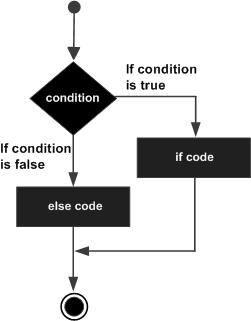
In C, conditional statements are implemented through if-else statements.


Syntax :

 if(condition-A)
{
          Statements-A;
}
else if(Condition-B)
{
          Statements-B;
}
else
{
          Statements-C;
}

Example:
Code:


Output:


We use conditional statements to direct the direction of flow of control of our program into respective parts of the program by using some respective conditions.

When the flow of control reaches ‘if - else’  block, first it will check the condition that is present inside the parenthesis of ‘if’ block. If the condition evaluates to be true then the flow of control will go inside the ‘if’ block and execute the statements in it. After that flow of control skips all the else-if blocks and final else block and continues with the rest of the program.
If the ‘if ’condition evaluates to be false then compiler will check the next else-if block condition. If else-if block condition is true then those statements present in else-if block will be executed. If the else-if condition is false then compiler will check for the next else-if condition if it is present.

When ‘if’ condition and all the else-if conditions are false then the statements inside the ‘else’ block are executed.


Note: we can use multiple 'else-if' blocks corresponding to one 'if' block but we can use only one 'else' block corresponding to one 'if' block. Using 'else-if' and 'else' blocks without any preceding 'if' block is an error. We can also use nested if-else block.

Practice Question: write a program to print whether a given number is even or odd using if-else statements.

comment your solution in the comment section below.

That’s all for this post. In the next post we’ll discuss about  Switch case statements.

Share it with your co-geeks and help me to improve by giving feedback in the comments section below.

Thank you.

Thanks to Binshumesh Sachan for helping me in editing.

Thanks alot to Nikhitha, Bhavani, Sadhana, Kailash varma, Devendhar, Manoj, Rakesh, Karthik, Koushik, Soma Sekhar, Saqlain, Jaswanth and all other who are sharing these posts with their Co-geeks. Once again thank you guys. 

 ABOUT ME


MYSELF SUJITH SAGAR. I AM A B.tech SECOND YEAR  COMPUTER SCIENCE AND ENGINEERING STUDENT AT NATIONAL INSTITUTE OF TECHNOLOGY DELHI.


How Can You Test and Revert a Failover in Azure Cache for Redis Premium with Geo-Replication?

If you're using Azure Cache for Redis Premium with geo-replication across different regions, knowing how to test failover and revert it ...