Saturday, February 16, 2019

Basics of Programming in C (part-3)


Hello Everyone!


Welcome to my 4th post. First of all, I should thank my parents, sister and my friends for supporting me and encouraging me.

In the previous post I covered topics like constants, variables and data-types etc.
Basics of Programming in C (part-2):

In this post I am going to explain about Conditional statements. This post will take less than 5 minutes to completely read and understand it.

Understanding Conditional Statements

In order to understand conditional statements, first we need to understand conditions.
In C, conditions are logical statements whose final value will be either true(it is generally represented as integer 1 or any non-zero integer ) or false(it is represented as 0)

In logical statements, we need to use logical operators.
Some of the logical operators are:

·        == (if L.H.S and R.H.S are equal then this operator returns true(1) else returns false(0))
Example: (2+1)==3 returns true and 2==3 returns false

·        < (if L.H.S is less than R.H.S then this operator returns true(1) else returns false(0))
Example: 2<3 returns true and 5<4 returns false

·        > (if L.H.S greater than R.H.S then this operator returns true(1) else returns false(0))
Example: 3>2 returns true and 2>8 returns false

·        <= (if L.H.S less than or equals to R.H.S then this operator returns true(1) else returns false(0))
Example: 2<=3 returns true and 4<=3 returns false

·        >= (if L.H.S greater than or equals to R.H.S then this operator returns true(1) else returns false(0))
Example: 4>=3 returns true and 6>=10 returns false

·        != (if L.H.S and R.H.S are not equal then this operator returns true(1) else returns false(0))
Example: 2!=3 returns true and (2+4)!=(3+3) returns false

In C, conditional statements are implemented through if-else statements.
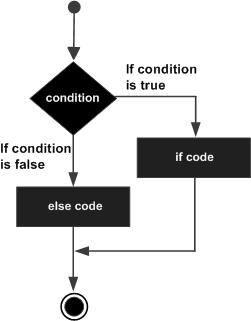


Syntax :

 if(condition-A)
{
          Statements-A;
}
else if(Condition-B)
{
          Statements-B;
}
else
{
          Statements-C;
}

Example:
Code:


Output:


We use conditional statements to direct the direction of flow of control of our program into respective parts of the program by using some respective conditions.

When the flow of control reaches ‘if - else’  block, first it will check the condition that is present inside the parenthesis of ‘if’ block. If the condition evaluates to be true then the flow of control will go inside the ‘if’ block and execute the statements in it. After that flow of control skips all the else-if blocks and final else block and continues with the rest of the program.
If the ‘if ’condition evaluates to be false then compiler will check the next else-if block condition. If else-if block condition is true then those statements present in else-if block will be executed. If the else-if condition is false then compiler will check for the next else-if condition if it is present.

When ‘if’ condition and all the else-if conditions are false then the statements inside the ‘else’ block are executed.


Note: we can use multiple 'else-if' blocks corresponding to one 'if' block but we can use only one 'else' block corresponding to one 'if' block. Using 'else-if' and 'else' blocks without any preceding 'if' block is an error. We can also use nested if-else block.

Practice Question: write a program to print whether a given number is even or odd using if-else statements.

comment your solution in the comment section below.

That’s all for this post. In the next post we’ll discuss about  Switch case statements.

Share it with your co-geeks and help me to improve by giving feedback in the comments section below.

Thank you.

Thanks to Binshumesh Sachan for helping me in editing.

Thanks alot to Nikhitha, Bhavani, Sadhana, Kailash varma, Devendhar, Manoj, Rakesh, Karthik, Koushik, Soma Sekhar, Saqlain, Jaswanth and all other who are sharing these posts with their Co-geeks. Once again thank you guys. 

 ABOUT ME


MYSELF SUJITH SAGAR. I AM A B.tech SECOND YEAR  COMPUTER SCIENCE AND ENGINEERING STUDENT AT NATIONAL INSTITUTE OF TECHNOLOGY DELHI.


Sunday, February 3, 2019

Basics of Programming in C (part-2)

Hello Everyone!

Welcome to my 3rd post.First of all, I should thank my parents, sister and my friends for supporting me and encouraging me.

In the previous post I covered topics like installation of compiler, Writing our first C program etc.
Basics of Programming in C (part-1):
https://codewithsujithsagar.blogspot.com/2019/02/basics-of-programming-in-c-part-1.html

In this post I am going to explain about constants, variables and data-types with some simple examples. This post will take only 5 minutes to completely read and understand it.

Understanding constants, variables and data-types

By the name itself we can understand that constants are those whose value doesn’t change and variable are those whose value can be changed.

The Data-type of a value or variable is an attribute that tells what kind of data that value or variable can have. Some of the data-types are 
int (for integer values like -56, 0, 89 etc)
float (for floating values like 2.36, 5.298 etc)
char (for characters like ‘A’, ’b’, ’%’ , ‘4’, compiler will treat ‘4’ as a character as it is enclosed within apostrophe. So 4 is an integer and ‘4’ is a character).

A variable having integer data-type indicates that we can only store integer values in that variable and a constant is said to be having integer data-type if it is an integer.

Similarly, a variable having float data-type indicates that we can store floating values in that variable and a constant is said to have float data-type if it is a floating number.

We will store constants in variables by assigning them to variables. Here we need to remember that we can only assign that constant to variable where both of their data-types are same.

However, there are some exceptions. We can store an integer value in a float variable (that integer variable is automatically converted to float, for example ‘2’ is converted to ‘2.0’).
Similarly, we can store float values in integer variables but the floating number are rounded off to integer values while assigning them (for example, ‘3.67’ is converted to ‘3’).

Memory

Each variable occupies some amount of memory in the computer. The amount of memory that is occupied by a variable is depended upon the data-type of that variable. Each memory location will have some address. That memory is allocated to the variable when we initialize the variable. In background, the required amount of memory that will be occupied by the variable is named as that variable_name and each memory location have some address.

In order to assign any value to a variable, we should use = (assignment operator).
Variable should be on the left side of the = operator and the value which we want to store should be on the right side of the = operator. We can also assign the value of one variable to other. We can also perform arithmetic operation on variables and constants while assigning them to a variable.
Example:
int x = 3;
int y = 2;

For example, we can consider a bag which can hold at most one book at a time as a variable and it’s data-type is book (so, that bag can only hold books) and books of different subjects each as constants. Here that school bag may contain a book related to math or science or social or any other subject but at an instance of time it will contain anyone of them. So here we can change books in that bag. But if we observe, we cannot transform math textbook into social textbook, we can only replace them by removing one from bag and by adding the other. We can say that the data-type of the school bag is book. That means we cannot keep a cricket bat in that school bag. Don’t think about the size of bat and bag, we can’t even keep a pencil in that bag instead of book because the data-type of the bag is book.

Syntax for variable initialization and declaration:

Data-type variable_name;
Data-type variable_name = constant;
Data-type variable_name = another_variable + constant * (another_variable);

Example:
int x = 3;
int y = 2;
int z = x*(y+3);

To display the value stored in a variable we should know about format specifiers which tells to compiler about which type of variable you are trying to display.

int -> %d
float -> %f
char -> %c

syntax:
printf(“format_specifier”,variable_name);

usage:
printf(“The value stored in the variable X is %d”,X);

Now we know how to display the text and the values stored in a variable using printf statement. We can store the values in variables by using scanf statement.

Syntax:
scanf(“format_specifier”,&variable_name);

example:
scanf(“%d”,&x);

Here x is variable of int data-type and we need to declare x as an int variable above the scanf statement. Otherwise, compiler will throw an error because we already saw that compiler starts compiling from first line to last line of program sequentially. It is our job to tell compiler that we are going to use some type variable before using that variable.

If you notice, in the syntax of scanf statement we used symbol ‘&’ which tells the compiler to store this constant in that memory location(at the address of variable x).

Note: while printing a value of a variable we don’t use & symbol as a prefix for variable_name whereas while using scanf statement to store them we should use & symbol as a prefix for variable_name.

Try executing the following statement,

int x=2;
printf(“%u is the address of variable x”,&x);

'%u' is for unsigned integer.
for more information:
https://www.w3schools.in/c-tutorial/format-specifiers/

That’s all for this post. In the next post we’ll discuss about Conditional statements.
https://codewithsujithsagar.blogspot.com/2019/02/basics-of-programming-in-c-part-3.html

Share it with your co-geeks and help me to improve by giving feedback in the comments section below.

Thank you.

Thanks to Binshumesh Sachan and Shaik Saqlain Musthak for helping me in editing.

Thanks alot to Nikhitha, Bhavani, Sadhana, Kailash varma, Devendhar, Manoj, Rakesh, Karthik, Koushik, Soma Sekhar and all other who are sharing these posts with their Co-geeks. Once again thank you guys. 

 ABOUT ME


MYSELF SUJITH SAGAR. I AM A B.tech SECOND YEAR  COMPUTER SCIENCE AND ENGINEERING STUDENT AT NATIONAL INSTITUTE OF TECHNOLOGY DELHI.

Linkedin profile: www.linkedin.com/in/sujith-sagar-gandi-2b3544179

Friday, February 1, 2019

Basics of Programming in C (part-1)


Hello Everyone!

After receiving a lot of support and encouragement from my parents, friends and well-wishers on behalf of my first blog, I am very excited to write more.
The main objective of this blog is to support engineering students especially first year students in understanding the concepts of C language.
As I am an engineering student I can closely relate to the problems that beginners will face while writing a code. This post will take approximately 5 minutes to complete it. I am sure that you are going to enjoy reading it. 
Welcome to the wonderful world of Programming 
Most of the people feels that it is very difficult (May be not you). But it is as simple as learning how to ride a bicycle.
We can’t ride a bicycle by simply learning it from some books like “RIDE A BICYCLE IN 30 DAYS!!”. First of all, we need a bicycle, a person who already know how to ride it (we should also trust that person 😊), courage and most importantly confidence on us that we can learn it.
Similarly, we can’t learn programming effectively if we are not practicing it. Don’t worry about making errors. I am sure that we all fell down at least once while learning to ride a bicycle. Making errors (or) mistakes are also the steps to learn something.
EACH MISTAKES TEACHES US SOMETHING
If we observe, the person who is guiding you while riding a bicycle is similar to a book while learning programming learning and the role of bicycle is similar to the role of some practice environment, in this case that role is played by compiler. If either one of them are not present then  I am sure that we can’t learn programming.
          I believe in interactive learning.
So, in order to make it interactive I strongly suggest you to practice and write programs.
PRACTICE MAKES PROGRAMMER BETTER
The reason why I didn't use the word "perfect" is we can’t bring perfection to our program. Always, there exists a better solution. That is the beauty of programming.
Tell me and I forget.
Teach me and I remember.
Involve me and I learn.
-          Benjamin Franklin

Where to practice? 
 I strongly recommend you guys to download any C compiler which are available for free of cost on internet. 
You can also practice on online compilers.
Some them are

You can go to the below link to download Dev C++ compiler. I prefer it because you can compile both C programs and C++ programs in it. 
You can also refer to the following video link from which you can learn how to use Dev C++ compiler. 
Wait. Hold on…... 
First of all, why do we need a compiler? 
We need a compiler to convert our programs which are written in high level languages (such as C, C++ etc) to low level language (machine code). Computer cannot understand the language we speak. It can only understand binary language which have only combinations of ‘0’ and ‘1’. 
Then why aren‘t  we  write programs in binary language? 
It is very difficult to write programs in binary language. Just imagine, whole code just containing 0 and 1. It will be terrific. 
In all my upcoming posts, I will try to explain the concepts through the programs. I will start with basics and try to cover all the necessary concepts which are important in a sequential manner. I am sure that you will get a kick start into the beautiful world of programming. 
Now the time has come……... 
Let us write our first C program!!!!! 
Our aim is  to display the text “I can do it” on the monitor. 
Open Dev C++, create a new source file (CTRL + N) and save it. 
Now type the below code in that source file. 
SOURCE CODE: 
#include<stdio.h>
int main()
{
            printf("I can do it.");
            return 0;
} 
 //END OF THE PROGRAM
Compile it by pressing fn+ F9 
Run it by pressing fn + F10 
output:  
output
Detailed explanation of above code:
Compiler starts compiling the program from the first line(top to bottom) and character by character(left to right). 
In the first line we used “#include<stdio.h>” which means that we are instructing compiler to include “stdio.h” file which is a header file. Std means  standard, I means input and O means  output.This file contains prototypes for some functions(we will see what are functions in upcoming posts) mainly for performing operations like taking input and displaying (or) printing output. Functions are basically represented as function_name(arguments). 
In the next line we wrote “int main()”. “int” is the returning type of the function “main”. Empty parenthesis indicates that function main takes no arguments. This is represents calling of main function which will return an integer.(Don’t worry if you are not able to understand this explanation , we are going to explain each and every important aspect of it in upcoming posts) 
Now we have a set of { } immediately after the main function, which indicates the all the statements that are included in between these parameters belongs to main function. 
Inside main function we wrote “printf(“I can do it”);” which is for displaying the text “I can do it”. 
The syntax of printf statement is
 printf(“…….. text……… ”) ; 
A semicolon ‘;’ is compulsory at the end of each statement. If we didn’t type semi-colon at the end of statement then compiler will give an error. 
After that we are returning the integer value zero.(we will discuss it later) 
We are closing the main function with ‘}’. 
         Now try yourself by replacing the text, without typing semi-colon etc. Explore it…...
After compiling and running the program, we can observe that printf statement displays whatever text is present in between the (“   _______    ”). 
In the next post I am going to cover very interesting and basic concepts of constants, variables, pointer and data-types. 
Share it with your co-geeks and help me to improve by giving feedback in the comments section below.
Thank you.
Thanks to Binshumesh Sachan for helping me in editing and Sumanth                Nidamanuri for helping me in adding more useful content.

Thanks alot to Nikhitha, Bhavani, Sadhana, Kailash varma, Devendhar, Manoj, Rakesh, Karthik, Koushik, Soma Sekhar and all other who are sharing these posts with their Co-geeks. Once again thank you guys. 

Next post:
https://codewithsujithsagar.blogspot.com/2019/02/basics-of-programming-in-c-part-2.html

ABOUT ME


MYSELF SUJITH SAGAR. I AM A B.tech SECOND YEAR  COMPUTER SCIENCE AND ENGINEERING STUDENT AT NATIONAL INSTITUTE OF TECHNOLOGY DELHI.

Linkedin profile: www.linkedin.com/in/sujith-sagar-gandi-2b3544179


How Can You Test and Revert a Failover in Azure Cache for Redis Premium with Geo-Replication?

If you're using Azure Cache for Redis Premium with geo-replication across different regions, knowing how to test failover and revert it ...